Why I’m writing this series
I’ve deployed a few workloads on GPU nodes in EKS. I set nvidia.com/gpu: 1 in the pod spec, the pod landed on a g4dn node, and it worked. But if someone had asked me what actually happened behind that one line, I couldn’t have answered.
So I’m learning GPUs from the ground up, the way you learn the alphabet: one letter at a time. Each part of this series covers one idea. Later parts include labs where I break something on purpose, look at the error, fix it, and explain why the fix works.
This is part 1. No commands to run yet, just the mental model everything else builds on.
CPU vs GPU
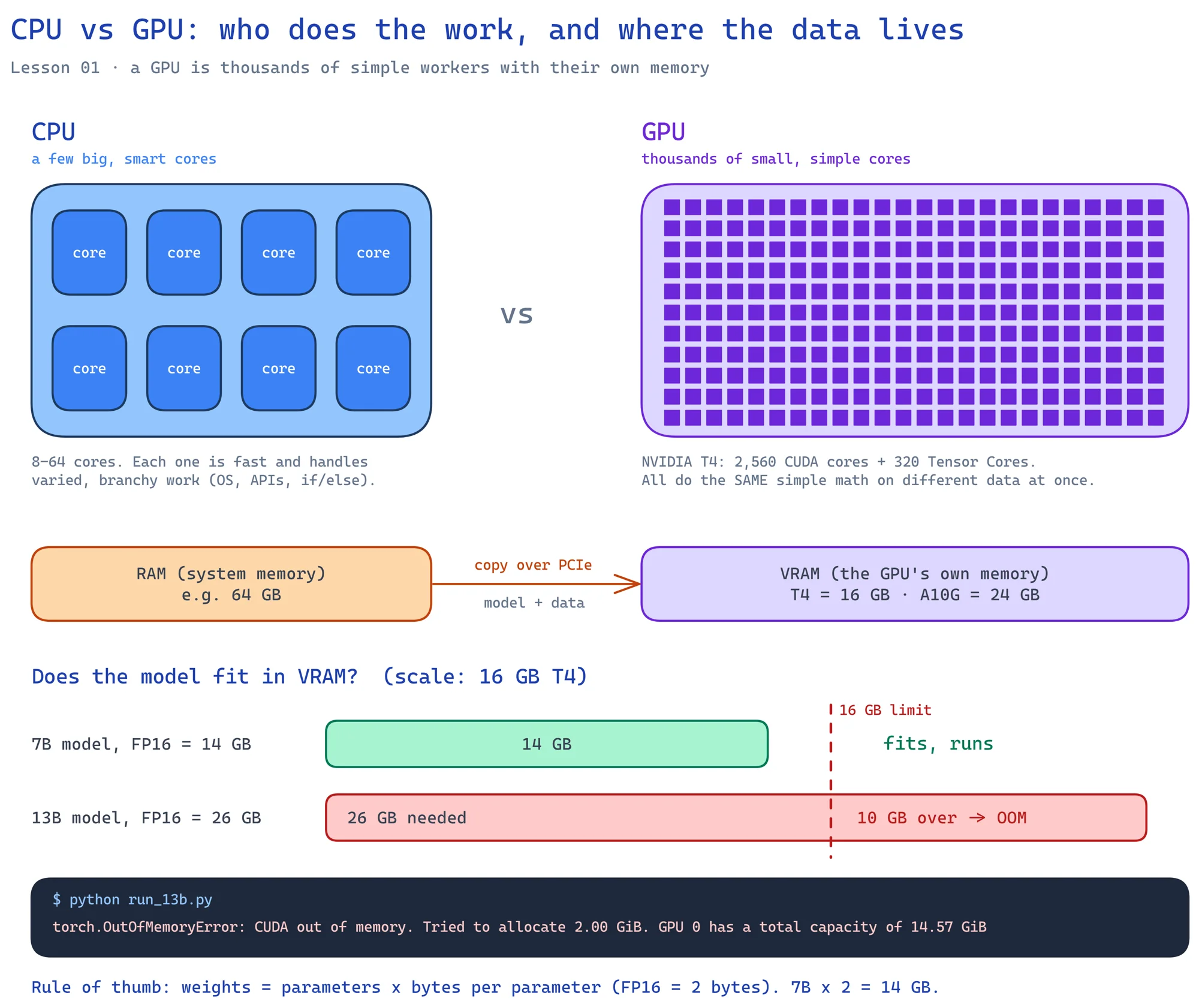
Every computer has a CPU. It has a small number of very capable cores, usually somewhere between 8 and 64 on a server. Each core is fast and good at work full of decisions: running the operating system, handling an API request, branching through if/else logic.
A GPU takes the opposite approach. It has thousands of small, simple cores. Each one is much weaker than a CPU core, but they all run the same simple math at the same time, each on a different piece of data.
An analogy that helped me: you have to check 10,000 exam papers against one answer key.
- CPU: one professor checks every paper, one after another. Smart, but slow.
- GPU: 1,000 students each check 10 papers at the same time. Done in minutes.
A GPU wins when you have a huge amount of the same simple work. For varied, step-by-step work it loses, which is why every GPU server still has a CPU running the show.
Why AI runs on GPUs
GPUs were built for graphics. A 1080p screen has about 2 million pixels, redrawn 60 times a second, and every pixel needs the same kind of calculation. That’s exactly the “huge amount of the same simple work” pattern.
Neural networks turned out to fit the same pattern. Training or running a model is mostly multiplying large tables of numbers (matrices) over and over. Graphics hardware happened to be very good at that, and that’s how GPUs ended up running AI.
For a sense of scale, the NVIDIA T4 in AWS g4dn instances has 2,560 CUDA cores for general parallel math and 320 Tensor Cores, special units built only for matrix multiplication.
The GPU has its own memory: VRAM
This is the part that matters most in day-to-day work.
A GPU has its own memory, called VRAM, separate from the machine’s RAM. The GPU can only work on data that sits in VRAM, so before anything happens, the model and the input data are copied from RAM into VRAM over the PCIe bus.
That leads to the most common GPU error you’ll ever see. If the model doesn’t fit in VRAM, PyTorch fails with:
torch.OutOfMemoryError: CUDA out of memory. Tried to allocate 2.00 GiB.
GPU 0 has a total capacity of 14.57 GiB
There’s a simple rule of thumb for checking whether a model will fit:
memory for weights = number of parameters x bytes per parameterAt FP16 precision each parameter takes 2 bytes, so:
| Model | Weights in FP16 | Fits on a T4 (16 GB)? |
|---|---|---|
| 7B parameters | 7 x 2 = 14 GB | Yes, just about |
| 13B parameters | 13 x 2 = 26 GB | No, out of memory |
That’s only the weights. Real workloads also need memory for activations, batches and caches, so a 7B model on a 16 GB T4 is tight in practice. We’ll come back to that when we break things in a later part.
Common GPUs on AWS:
| Instance family | GPU | VRAM |
|---|---|---|
g4dn |
NVIDIA T4 | 16 GB |
g5 |
NVIDIA A10G | 24 GB |
p4d |
NVIDIA A100 | 40 GB (x8) |
Words to know
| Word | Meaning |
|---|---|
| GPU | The chip with thousands of simple cores |
| VRAM | The GPU’s own memory |
| CUDA | NVIDIA’s platform that lets programs send work to the GPU |
| Driver | Software that lets the operating system talk to the GPU |
nvidia-smi |
Command that shows your GPUs, their memory and usage |
Back to Kubernetes
When a pod asks for nvidia.com/gpu: 1, Kubernetes schedules it on a node that has a free GPU and gives it one whole GPU, including all of that GPU’s VRAM. By default a GPU isn’t shared between pods. Each upcoming part of this series explains another piece of what happens behind that single line.
Try it yourself
You don’t need your own GPU for this. Google Colab gives you a free T4:
- Open colab.research.google.com and create a new notebook.
- Go to Runtime → Change runtime type, pick T4 GPU, and save.
- Run
!nvidia-smiin a cell.
Find the GPU name, the total memory, the driver version and the CUDA version. Part 2 goes through that output line by line.